
Elementor vs Gutenberg: Which One Should You Actually Use?
If you’ve spent any time building a WordPress site, you’ve probably run into this debate. Someone in a Facebook group swears by Elementor. Someone else insists Gutenberg is “the future” and you shouldn’t need a plugin at all. Both are right, honestly — it just depends on what you’re building and how much patience you have for learning something new. If you use it properly twice, your debate has ended.
I’ve used both on real client projects, so here’s my honest take.
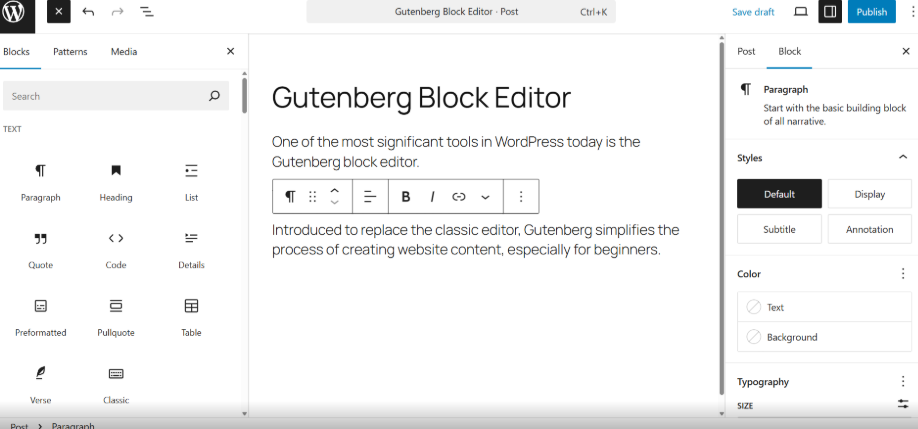
What Gutenberg Actually Is
Gutenberg is the block editor that ships with WordPress by default. No installation, no extra plugin, no learning a whole new interface — you open a post or page, and it’s just there. Every piece of content is a “block”: a paragraph, an image, a button, a column layout. You snap them together like Lego and is so easy to navigate.
The big win here is speed and simplicity. Pages load faster because there’s less bloated code running in the background. It’s also free forever, tightly integrated with core WordPress updates, and honestly good enough for blogs, simple business sites, portfolio sites and anyone who doesn’t need pixel-perfect custom layouts.
The downside? It still feels limited if you want fine-grained design control. Spacing, animations, and complex multi-column layouts can get fiddly without extra block plugins like Kadence Blocks or Spectra. All types of free plugins are available there in WordPress.
What Elementor Actually Is
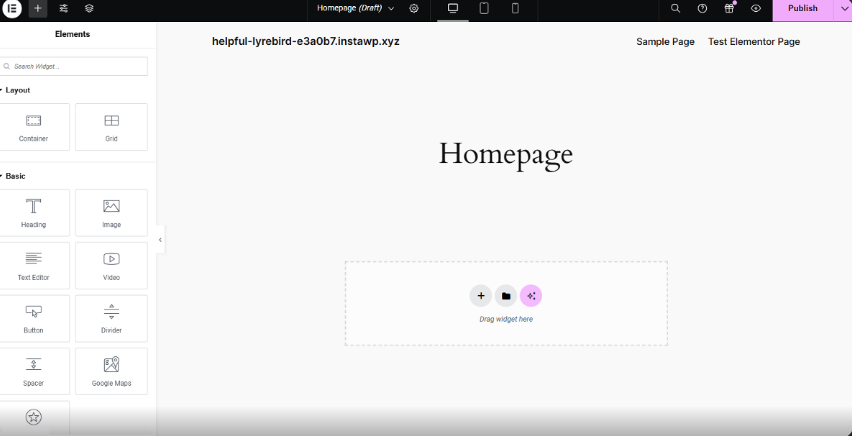
Elementor is a drag-and-drop page builder plugin, and it’s been the go-to for freelancers and agencies for years. You get a live visual canvas — what you see while editing is exactly what visitors see. Want to nudge a button 10 pixels to the left? Just drag it. Want a hover animation on a pricing card? A few clicks, no code. It’s the most popular page builder plugin.
It comes packed with pre-built templates, Blocks, widgets, and a massive theme-building system (headers, footers, popups, WooCommerce pages — all customizable). For anyone building a portfolio, landing page, business sites or a site for a client who wants something that looks “designed,” Elementor is hard to beat.
The catch: it adds extra CSS and JS to your site, which can slow things down if you’re not careful. The free version is decent, but you’ll likely want Elementor Pro for real client work, and that’s a recurring cost. Elementor free version is also good for simple sites.
So Which One Wins?
Honestly, there’s no universal winner — it comes down to your project.
- Choose Gutenberg if you want a lightweight, fast, free site and don’t mind a simpler design ceiling. Great for blogs, news sites, and minimalist businesses.
- Choose Elementor if visual control matters more than raw speed, or if you’re building for clients who expect a polished, custom look without touching code.
A lot of developers these days actually use both — Gutenberg for content-heavy pages like blog posts, and Elementor for the homepage or landing pages where design really needs to shine.
My honest advice? Don’t overthink it. Try building one page in each. You’ll know within twenty minutes which one feels natural to you — and that feeling matters more than any feature comparison.